业务场景
最近在做一个关于bug收集的库,其中需要收集崩溃日志信息并在后台发送邮件给开发者。有三种方式可以实现当前的需求:1、苹果的自带的发送邮件方式。2、开源库SKPSMTPMessage 3、第三方库MailCore2。需要实现发邮件需求的同学请直接阅读第三章节。
苹果自带发送邮件
本来想把发送邮件的代码也贴上,但是实话说这个作用不大(个人觉得),界面比较简陋。而且需要手动去发送数据和个人的业务需求不符。(也可以理解为我懒😯)
SKPSMTPMessage
SKPSMTPMessage是一个开源的发送邮件第三方库,但是作者在两年前已经停止更新。收到的邮件标题会有乱码的。(按有的同学推荐去处理过但并没有效果····)
1
2
3
4
5
6
7
8
9
10
11
12
13
14
15
16
17
18
19
20
21
22
23
24
25
26
27
28
29
30
31
32
33
34
35
36
37
38
39
40
41
42
43
44
45
46
47
48
49
| SKPSMTPMessage *testMsg = [[SKPSMTPMessage alloc] init];
testMsg.fromEmail = @"xyhuangjia@yeah.net";
testMsg.toEmail = @"huangj@ywsoftware.com";
testMsg.relayHost = @"smtp.yeah.net";
testMsg.requiresAuth = YES;
testMsg.login = @"xyhuangjia@yeah.net";
testMsg.pass = @"***";
testMsg.subject = [NSString stringWithCString:"来自iphone socket的测试邮件" encoding:NSUTF8StringEncoding ];
testMsg.wantsSecure = YES;
testMsg.delegate = self;
NSDictionary *plainPart = [NSDictionary dictionaryWithObjectsAndKeys:@"text/plain",kSKPSMTPPartContentTypeKey,
@"This is a test message.\r\n支持中文。",kSKPSMTPPartMessageKey,@"8bit",kSKPSMTPPartContentTransferEncodingKey,nil];
NSString *vcfPath = [[NSBundle mainBundle] pathForResource:@"video.jpg" ofType:@""];
NSData *vcfData = [NSData dataWithContentsOfFile:vcfPath];
NSDictionary *vcfPart = [[NSDictionary alloc ]initWithObjectsAndKeys:@"text/directory;\r\n\tx-unix-mode=0644;\r\n\tname=\"video.jpg\"",kSKPSMTPPartContentTypeKey,
@"attachment;\r\n\tfilename=\"video.jpg\"",kSKPSMTPPartContentDispositionKey,[vcfData encodeBase64ForData],kSKPSMTPPartMessageKey,@"base64",kSKPSMTPPartContentTransferEncodingKey,nil];
NSString *wavPath = [[NSBundle mainBundle] pathForResource:@"push" ofType:@"wav"];
NSData *wavData = [NSData dataWithContentsOfFile:wavPath];
NSDictionary *wavPart = [[NSDictionary alloc ]initWithObjectsAndKeys:@"text/directory;\r\n\tx-unix-mode=0644;\r\n\tname=\"push.wav\"",kSKPSMTPPartContentTypeKey,
@"attachment;\r\n\tfilename=\"push.wav\"",kSKPSMTPPartContentDispositionKey,[wavData encodeBase64ForData],kSKPSMTPPartMessageKey,@"base64",kSKPSMTPPartContentTransferEncodingKey,nil];
testMsg.parts = [NSArray arrayWithObjects:plainPart, nil];
[testMsg send];
|
设置代理
1
2
3
4
5
6
7
8
9
10
11
|
- (void)messageSent:(SKPSMTPMessage *)message
{
NSLog(@"send success");
}
- (void)messageFailed:(SKPSMTPMessage *)message error:(NSError *)error
{
NSLog(@"message - %@\nerror - %@", message, error);
}
|
MailCore2发送邮件
MailCore2是什么?
MailCore2是一个很强大的邮件处理第三方库。MailCore 2提供了一个简单而异步的Objective-C API来处理电子邮件协议IMAP,POP和SMTP。支持多种平台。。。这个如果有兴趣的话可以去看一下,传送门
如何配置
使用stmp协议发送邮件的话需要获取邮箱独立密码,我以自己的网易云邮箱作为案例来进行配置一波
第一次选择这个
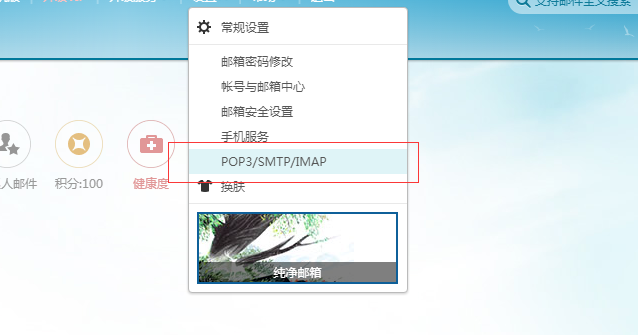
然后
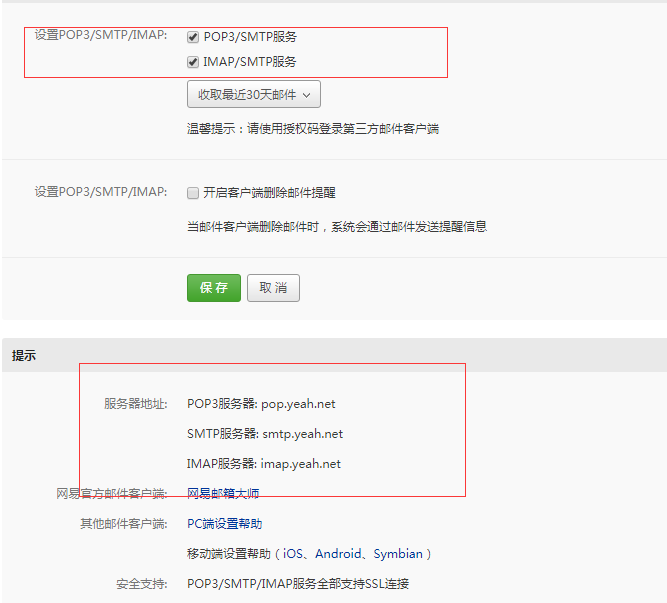
大写的尴尬。。。。。。。
还是给个官方的传送门得了,传送门在此
重要参数
一、用户名密码
登录邮箱的发送者账号和密码(独立的邮箱密码,和登录邮箱密码不同,申请方式见如何配置部分)
1
2
3
4
| NSString * userName = @"xyhuangjia@yeah.net";
NSString * passWord = @"不给你看";
smtpSession.username = userName;
smtpSession.password = passWord;
|
二、接受者的账号
可以直接填写邮件接收人和抄送以及密送人员名单,基本可以实现pc端邮件发送的功能
1
2
3
4
5
6
7
| NSMutableArray *to = [[NSMutableArray alloc] init];
NSArray * recipients = @[@"2587171762@qq.com",@"huangj@ywsoftware.com"];
for(NSString *toAddress in recipients) {
MCOAddress *newAddress = [MCOAddress addressWithMailbox:toAddress];
[to addObject:newAddress];
}
[[builder header] setTo:to];
|
示例代码
1
2
3
4
5
6
7
8
9
10
11
12
13
14
15
16
17
18
19
20
21
22
23
24
25
26
27
28
29
30
31
32
33
34
35
36
37
38
39
40
41
42
43
44
45
46
47
48
49
50
51
52
53
54
55
| MCOSMTPSession *smtpSession = [[MCOSMTPSession alloc] init];
smtpSession.hostname = @"smtp.yeah.net";
smtpSession.port = 465;
NSString * userName = @"xyhuangjia@yeah.net";
NSString * passWord = @"不给你看";
smtpSession.username = userName;
smtpSession.password = passWord;
smtpSession.connectionType = MCOConnectionTypeTLS;
MCOMessageBuilder * builder = [[MCOMessageBuilder alloc] init];
[[builder header] setFrom:[MCOAddress addressWithDisplayName:@"黄佳" mailbox:userName]];
NSMutableArray *to = [[NSMutableArray alloc] init];
NSArray * recipients = @[@"2587171762@qq.com",@"huangj@ywsoftware.com"];
for(NSString *toAddress in recipients) {
MCOAddress *newAddress = [MCOAddress addressWithMailbox:toAddress];
[to addObject:newAddress];
}
[[builder header] setTo:to];
NSDictionary *infoDictionary = [[NSBundle mainBundle] infoDictionary];
NSString *app_Name = [infoDictionary objectForKey:@"CFBundleDisplayName"];
NSString * subject = [NSString stringWithFormat:@"%@的Crash报告",app_Name];
[[builder header] setSubject:subject];
NSData * rfc822Data = [builder data];
MCOSMTPSendOperation *sendOperation = [smtpSession sendOperationWithData:rfc822Data];
[sendOperation start:^(NSError *error) {
if(error) {
NSLog(@"%@ Error sending email:%@", userName, error);
} else {
NSLog(@"%@ 成功的发送了邮件", userName);
}
}];
|